Telemetrix
- Year
- 2026
- Type
- Side project
- Status
- In development
- Stack
- Go
- Next.js
- React
- Expo
- React Native
- Supabase Postgres and Auth
- Redis Streams
- EMQX (MQTT)
- Tailwind CSS
- TanStack Query
Summary
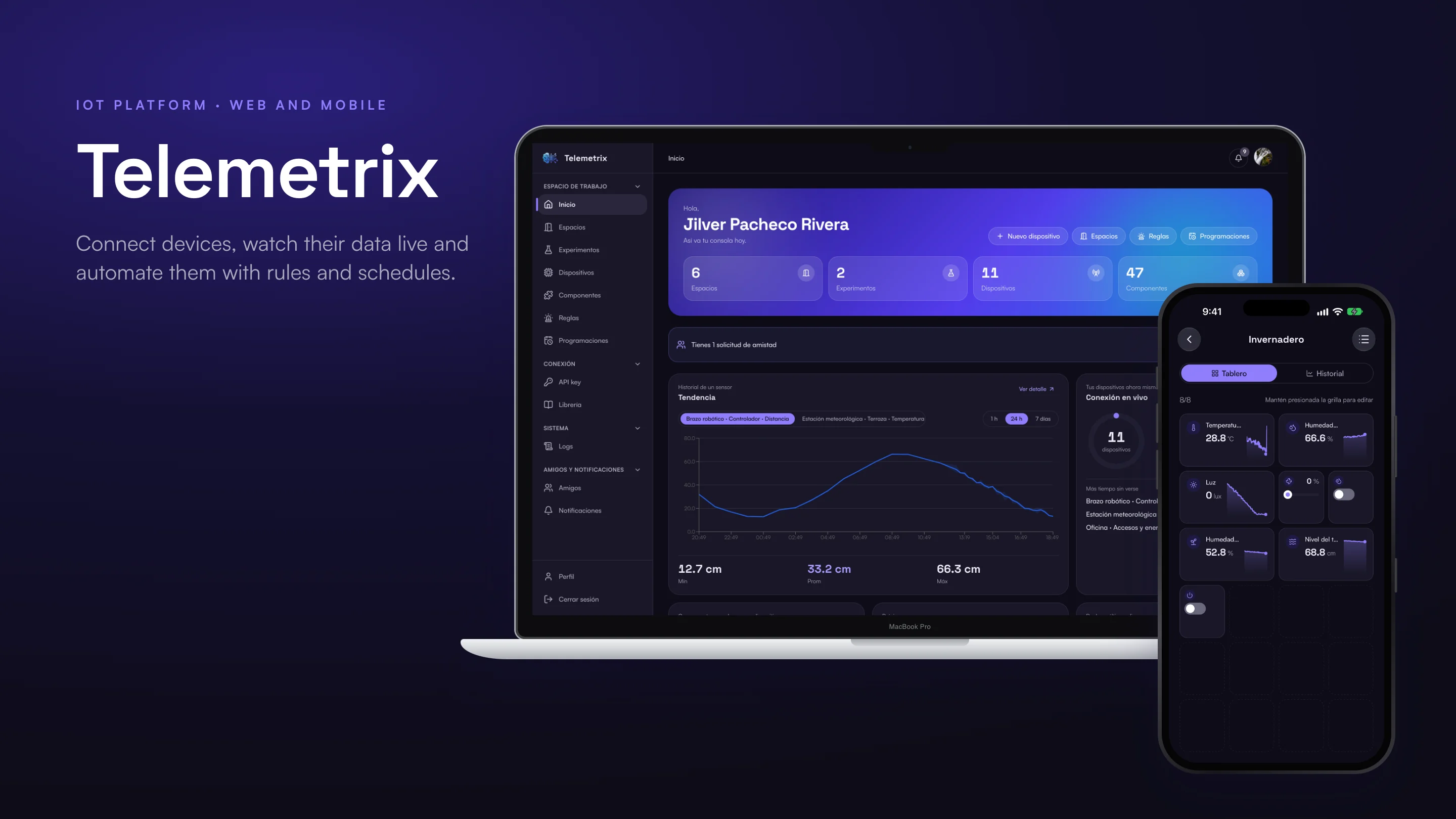
Telemetrix is an IoT platform for makers and developers. You register your devices, such as an ESP32, an Arduino or a Raspberry Pi, describe their sensors and actuators, and watch what they report on live dashboards, from the web or from the phone.
Devices are grouped into spaces, such as a greenhouse, an office or an equipment room, or into experiments for the tests that do not belong to a place yet. Each space is a board of widgets that move as the readings arrive. Rules send an alert or move an actuator when a value crosses a limit, data stops arriving or a device goes offline, and schedules send a value to an actuator at a set time. Spaces can be shared with friends.
The product is made of three parts:
- A web console with every device, space, rule and schedule.
- A mobile app for iOS and Android with the same features.
- An API that devices talk to with one key, over HTTP, WebSocket or MQTT.
It is one of my own products: I designed it, built it and run it end to end. The case study shows it through its screens, flows and diagrams.
- 16
- product capabilities
- 29
- device models in the catalog
- 3
- ways to connect: HTTP, WebSocket and MQTT
Context & role
- Product: My own IoT platform, with a web console, a mobile app and a device API
- My role: Product, design system, backend, web and mobile
- What I built: All of it, from the Go API and its real-time pipeline to both apps and the device library
- Languages: Spanish and English
- Status: In development
Problem
Makers sit between two kinds of tools. Hobby tools are fine for a weekend prototype but stop at a single chart. Industrial platforms do everything, but they are built for companies with a team to run them. To collect data from a few devices, see it live and react to it, a maker usually ends up assembling a broker, a database and a dashboard tool, and keeping them alive.
The scope of the platform shows where that hurts:
- Connecting a device should take an API key and a few lines of code, not a server.
- Seeing what is happening should be live, on the phone too, without building a dashboard by hand.
- Reacting to a reading, or to a device that went silent, should be a rule, not a script running somewhere.
- Sharing a greenhouse or a room with someone else should not mean sharing an account.
The maker carries most of that weight. They build the device, write its firmware and want to see it work in minutes, so most of the product was designed around the first hour: from creating an account to watching the first reading move a widget.
Users & context of use
Three profiles use Telemetrix, plus the devices themselves, which talk to the API with the account's key.
Maker
Builds a device, registers it with its sensors and actuators, and watches and automates it from a space.
Web console and mobile app
Friend
Gets a space shared with view, interact or edit access, and follows it from their own account.
Web console and mobile app
Platform owner
Watches the platform as a whole and manages developers, without seeing anyone's device data.
Owner console on the web
The moments that shaped the design
- The first reading. A maker who just flashed a board wants to see a number move. The library gives the code to copy, and the device page shows the reading the moment it lands.
- Away from the desk. The greenhouse is checked from the phone, so the app had to have the same boards, rules and schedules, not a reduced view.
- A device that goes quiet. Silence is a signal too, so a rule can fire when data stops arriving or the device disconnects, not only on a value.
- A space shared with someone. A friend sees the same board in their own account, with the access the owner chose.
Goals, success metrics & constraints
Goals
- Go from a new account to a first reading on a board in minutes.
- Show readings live on the web and on the phone.
- React to readings, and to their absence, with rules and schedules.
- Let people share a space without sharing an account.
- Keep each free device almost free to serve.
How success would be measured
The product is still in development, so there are no usage figures yet. These are the metrics I set for it:
| Goal | Metric | What it tells us |
|---|---|---|
| A fast first hour | Time from sign-up to the first reading | Whether the library and the device flow do their job. |
| Live data | Time from a reading to the widget, p95 | Whether boards feel live. |
| Automation | Share of devices with at least one rule or schedule | Whether people move from watching to reacting. |
| Sharing | Spaces shared per active user | Whether the friends model is used. |
| Cost | Cost per active device per month | Whether the free tier is sustainable. |
Constraints
- One person. Product, design, backend, web and mobile, so every piece had to be simple to run.
- No servers to babysit. Managed Postgres and authentication, and one Go binary instead of a fleet of services.
- Cheap per device. Limits are checked at the edge, before anything expensive is touched.
- Three transports. HTTP, WebSocket and MQTT had to behave the same way for every feature.
Process & prioritization
From problem to scope
The work started with written specs: a functional backlog of 16 capabilities and 83 features, a domain model and API contracts, and a decision record for every important choice. The first version followed a channel-based model. As the product took shape, the decision records replaced it with what the screens show today: devices with components, grouped into spaces and experiments, owned by one account and shared through friends.
What the platform covers
| Area | What it enables |
|---|---|
| Accounts | Sign-up with terms, sign-in with a code once per device, profile, deactivation and deletion with a grace period. |
| Devices and components | A catalog of 29 device models and 46 component types: sensors, controls and actuators. |
| Spaces and experiments | Places and playgrounds with live boards, history, export and templates. |
| Boards | A grid of widgets, edited by dragging and resizing, with separate layouts for web and mobile. |
| Rules | Thresholds, no data or device offline, with frequency, cooldown, email, push and actions on actuators. |
| Schedules | A value sent to an actuator once, every day or on chosen weekdays, in the user's time zone. |
| Connection | One API key, three transports, commands with acknowledgement and a library for Arduino and MicroPython. |
| Friends | Requests, shared spaces with view, interact or edit access. |
| Activity and notifications | An audit log of every action and an inbox of alerts and requests. |
What waited
- Derived channels and analysis, planned in the backlog, are not built yet.
- Webhooks and SMS actions, and rules written as expressions, come after email, push and actuator actions.
- A production deployment target is still being decided.
Design decisions
The decisions that most shaped the product. Click any image to open it larger. The screens are in Spanish, and every one of them also exists in English and in a light theme.
A code once per device, not every time
Problem. A second factor on every sign-in is safe, but a maker who checks the console ten times a day stops coming back.
Decision. The email code is asked once per browser or phone. After that, the device is trusted and signing in only needs the password.
Trade-off. Clearing the browser's data means a new code.
In the product. Sign-up shows each password requirement as it is met, and terms and privacy are accepted explicitly before the account exists.
A catalog instead of a blank form
Problem. Describing a board field by field is where most makers would give up.
Decision. A catalog of common boards brings their sensors and actuators already set up. Each component gets its own field, unit and type, and can be added or edited later.
Trade-off. The catalog has to be kept up to date as new boards appear.
In the product. When the device is created, its ID is shown right away, ready to be pasted into the firmware.
Places, not just devices
Problem. People think about their greenhouse or their office, not about device number four.
Decision. Devices live in spaces, and each space is a board. Widgets are placed on a grid and update live, and switches and sliders send values back to the actuators.
Trade-off. A board needs one layout for the web and another for the phone.
In the product. Templates create a greenhouse, a smart living room, an office or an equipment room with their devices and board in one step.
Silence is a condition too
Problem. The most important alert is often that nothing is arriving, and a threshold rule never notices that.
Decision. A rule can watch a value, a gap in the data or a device going offline. It chooses how often to warn, can wait between alerts, and can send a value to up to three actuators.
Trade-off. More options in one form, so the form explains each one in plain words.
In the product. A rule can be tested with a sample value before it is activated, and every alert and recovery stays in its history.
Time zones the user understands
Problem. Watering at six means six in the user's city, every day, including the day the clock changes.
Decision. A schedule is set in the user's own time zone, once, every day or on chosen weekdays. The server runs each occurrence once and skips it if it is too late to be useful.
Trade-off. No free-form expressions for now.
In the product. Each schedule shows its next run, and its history shows what was sent, what failed and what was skipped.
History without a separate tool
Problem. Live values tell what is happening now, but not whether today was hotter than yesterday.
Decision. Every component has a chart by hour, day or week, can be compared with the previous period, and any range can be exported.
Trade-off. Long ranges are read from rollups, not from every single reading.
In the product. Exports come as CSV, Excel or PDF, for up to ninety days.
One key, three ways in
Problem. Every device needs credentials, and managing a key per device is the first thing a maker gets wrong.
Decision. One API key per account, sent with the developer and device IDs, works the same over HTTP, WebSocket and MQTT. The library gives ready code for Arduino and MicroPython.
Trade-off. A leaked key exposes every device of the account, so it is shown once and can be revoked at any time.
In the product. The activity log records every action on the account, from where and with what result.
The whole product on the phone
Problem. A greenhouse is checked from the garden, not from a desk. A reduced mobile view would send people back to the laptop.
Decision. A native app for iOS and Android with the same spaces, boards, rules, schedules, friends and API key as the web console.
Trade-off. Two clients to keep in step, which the shared tokens and generated API client make cheaper.
In the product. Boards have their own layout for the phone, and rules and schedules are created and edited from the app.
Design system
The web console and the mobile app share one set of tokens, so a widget, a button or a status looks the same on both.
Foundations
- Two typefaces. Space Grotesk for headings and Satoshi for the interface, controls and data.
- A violet-blue brand. One primary for actions and focus, and a cyan glyph in the brand mark.
- Two themes from one palette. The dark ramps are the light ramps reversed, and every text role reaches AA contrast in both.
- Status colors with fixed meanings. Success, warning, destructive and info, each with a soft tint.
- Closed scales. Ten radius steps and a 4 px spacing step, the same on the web and in the app.
Built into both apps
The tokens are generated once for the web and used directly in the app. The web components build on shadcn and Radix, and the app reimplements the same components, variants and states for React Native. Both have a live catalog of the design system.
From design to code
This section explains how the platform is organized, in terms of what each part does.
Architecture
The API is a single Go binary organized as a modular monolith: twenty modules, each a hexagonal slice with its own database schema. Ingestion, storage, rules, schedules and real-time updates run as workers inside it, so there is one thing to deploy and transactions stay simple.
Postgres holds the readings in daily partitions with minute, hour and day rollups. Redis Streams is both the buffer a reading is acknowledged against and the event bus between modules, and an MQTT broker serves devices and apps, with access checked by the API.
The device never waits for the database
A reading is acknowledged as soon as it is safe in the stream, not when it reaches the database. Storage happens in batches, the boards move as it lands, and the rules of that device evaluate it right after. Repeated readings are ignored by their message ID.
Commands that arrive once
A command to an actuator is queued, delivered by whichever transport picks it up first and then acknowledged by the device. It is never delivered twice, and one that nobody picks up in time expires instead of arriving late.
Quality
The backend has 76 Go test files, most of them in identity, rules, devices and spaces, and architecture rules are checked automatically so modules do not depend on each other's insides. The API is described by 15 OpenAPI contracts and two AsyncAPI ones, and the clients for the apps are generated from them.
Technical decisions
| Decision | Why | Trade-off |
|---|---|---|
| A modular monolith in Go | One deploy and simple transactions for one person. | Workloads cannot scale independently. |
| Plain partitioned Postgres | Fewer moving parts than a dedicated time-series database. | Less compression, so rollup tables do the heavy lifting. |
| Redis Streams as buffer and bus | One system fewer than a dedicated broker. | Less durability, so consumers are idempotent. |
| One API key per account | Simple for makers, the same over three transports. | A leaked key exposes every device of the account. |
| Global roles, no organizations | A simpler model, with sharing through spaces. | No team workspaces. |
| Rules evaluated as readings arrive | Alerts in seconds, not on a timer. | Email and push are sent at most once. |
Results
The platform covers its whole loop: an account, a device from the catalog, a live board, rules, schedules, history and export, friends and shared spaces, on the web and on the phone, in Spanish and English, with a light and a dark theme.
It is still in development, so there are no usage figures yet. The next steps are a production deployment, more kinds of actions and analysis over the stored data.
Learnings & next steps
Next steps
- Choose a production target and put the platform in front of its first makers.
- Add webhooks and SMS to the actions, and rules written as expressions.
- Let shared users send commands with the access they were given.
What I learned
- Write the decision before the code. The model changed from channels to devices and spaces halfway through. Because every choice had a written reason, changing it was a matter of updating the records and following them.
- The first hour is the product. The catalog, the library and the live device page exist because a maker who does not see a number move in minutes does not come back.
- One design system pays twice. With the same tokens on the web and in the app, a new widget looked right on both from the first try.
Final product
A few screens of the product, with demo data.