Vigía
- Year
- 2026
- Type
- Side project
- Status
- In development
- Stack
- Go
- Next.js
- React
- Postgres with Row-Level Security
- Redis and asynq
- IndexedDB
- Tailwind CSS
- TanStack Query
- OpenTelemetry
- Docker
Summary
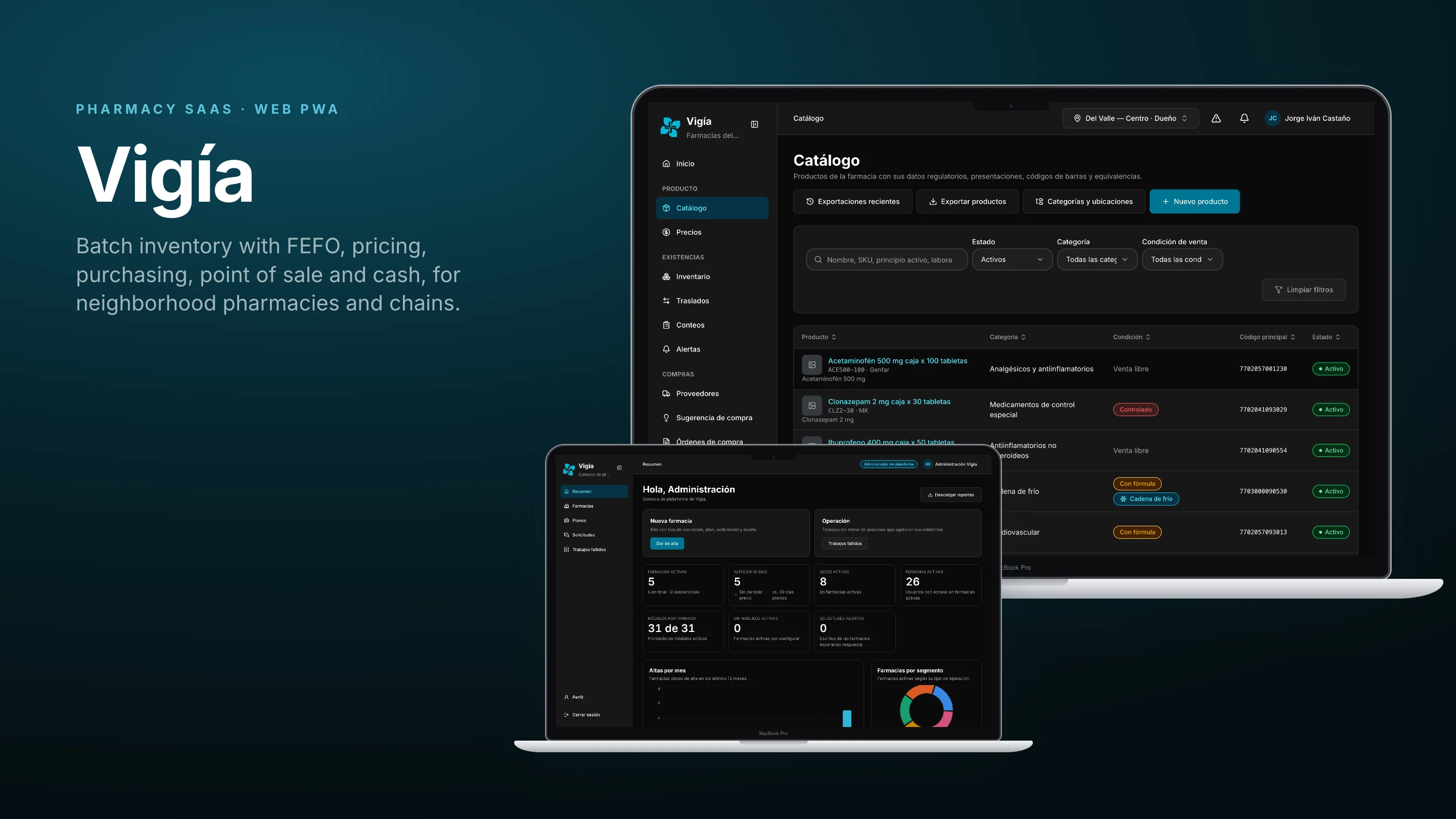
Vigía is a progressive web app that runs the day of a pharmacy: the catalog with its presentations and regulatory flags, one price per branch, batch-level inventory dispatched by FEFO (first expired, first out), purchasing, the point of sale, cash shifts and store credit. It also handles the team, with roles per branch and a second person for sensitive operations.
It is made of two apps on the same API:
- The pharmacy panel, where owners, pharmacists, cashiers and warehouse staff do their work, branch by branch.
- The platform console, on its own domain, where the platform onboards pharmacies, sets their plans and segments, and answers support.
Vigía is a private SaaS: every page needs a session, and there is no public storefront. It is one of my own products, and the case study shows both apps through their screens, flows and diagrams.
- 205
- features in the backlog
- 99
- features already complete
- 5
- pharmacy segments with their own rules
Context & role
- Product: My own SaaS for pharmacies, with a pharmacy panel and a platform console
- My role: Product, architecture, backend and both web apps
- What I built: The Go API and its worker, both PWAs, the offline mode, the contracts and the documentation
- Language: Spanish, the language of its users
- Status: In development
Problem
The story starts at the counter of a neighborhood pharmacy. Medicines expire on the shelf, fast-moving products run out without warning, and the shelf, the register and the price list say different things. Counting what is left of a batch, or finding who bought it, means searching by hand.
The context makes each of those problems harder:
- About 40% of products are sold in fractions, a box, a blister or a tablet, which does not fit an inventory counted by package.
- The internet goes down, and a counter that cannot sell loses the customer.
- One person often does everything. The same software has to serve a pharmacy of one and a chain with a role for every task.
- Health and data-protection rules leave no room for improvisation, from controlled substances to patient data.
So the product had to be simple enough for anyone on the team to sell without long training, and strict enough that every unit can be traced.
Users & context of use
Seven profiles use Vigía, six inside a pharmacy and one on the platform.
Owner
Sets prices, suppliers, purchasing, users and branches. In a small pharmacy also works the counter.
Pharmacy panel
Counter staff
Opens the shift, sells, charges, handles store credit and closes the register.
Point of sale
Warehouse staff
Receives goods, adjusts stock, counts and transfers between branches.
Receipts, batches and counts
Pharmacist-in-charge
Answers for controlled products, quarantines and the cold chain, and signs what only a pharmacist can sign.
Pharmacy panel
Branch or chain administrator
Runs a branch, or the whole chain with its central catalog, transfers and promotions.
Pharmacy panel, across branches
Accountant
Reads sales, valuation, taxes and cost centers without touching the counter.
Reports
Platform operator
Onboards pharmacies, manages plans, segments, modules and support. Never sees sales or patient data.
Platform console
The moments that shaped the design
- Opening the shift. Nothing is sold until a register is picked and the float is counted, bill by bill.
- A batch about to expire. The system has to say it before the shelf does, and the counter has to sell it first.
- The internet drops mid-sale. The counter keeps selling, and the sale is reconciled later without duplicates.
- A void or an adjustment. In a team, a second person authorizes it; in a pharmacy of one, it is logged instead.
Goals, success metrics & constraints
Goals
- Avoid losses from expiry and stockouts with batch-level control.
- Have one price per product, branch and presentation, the same everywhere.
- Trace every unit sold, damaged, returned or lost.
- Keep the counter selling without a connection.
- Serve a pharmacy of one and a chain with the same product.
How success would be measured
There is no pilot yet, so there are no usage figures. These are the metrics set for it:
| Goal | Metric | What it tells us |
|---|---|---|
| Fewer expiry losses | Value of stock expired per month, at cost | Whether alerts and FEFO work. |
| One price | Price differences found in counts and audits | Whether the price master is trusted. |
| Traceability | Share of movements with a batch and a reason | Whether every unit can be followed. |
| Offline counter | Sales made offline that sync without a conflict | Whether the offline mode holds. |
| Fast counter | Time to complete a sale, p95 | Whether the POS is fast enough at peak hours. |
Constraints
- The counter never stops. No network, cache or provider failure may prevent selling, charging or closing the register.
- Sensitive data from the start. Patient and health data are encrypted and every access is logged, in line with Colombian data-protection law.
- One database for every pharmacy, where the database itself refuses a query that has no pharmacy.
- Thin margins. The product has to run cheaply, so there is one API and one worker to deploy.
Process & prioritization
From problem to scope
The work started with a written base specification: goals, pain points, requirements, the data model, compliance and a phased plan. From it came a functional backlog of 46 capabilities and 146 features, a domain model, a C4 architecture, quality attributes and a decision record for every important choice. A second backlog of gaps added 59 features, and a unified backlog checks all 205 against the code.
What the product covers
| Area | What it enables |
|---|---|
| Platform | Pharmacies, plans, segments, modules per pharmacy, support requests and failed jobs. |
| Team and access | Invitations, several roles per branch, an active role, restricted role pairs and dual control. |
| Catalog | Products with presentations, barcodes, equivalences, photos, taxes and regulatory flags. |
| Pricing | One price per presentation and branch, history, rounding, customer lists, discounts, promotions and labels. |
| Inventory | Batches with FEFO, warehouses, movements, counts, transfers, valuation and alerts. |
| Purchasing | Suppliers, purchase orders with approval, nightly purchase suggestions and receipts. |
| Sales and cash | Point of sale by unit, box or fraction, offline sales, shifts, counts, store credit and loyalty. |
| Compliance | An audit log chained by hash, privacy requests and consents, and encrypted health data. |
What waited
- Prescriptions, controlled-substance logs, recalls and most of the cold chain are designed but not built yet.
- Electronic invoicing is only a proposal, and expenses, accounting and payroll come after it.
- The public storefront was removed: Vigía stays a private tool for the people who work in the pharmacy.
Design decisions
The decisions that most shaped the product. Click any image to open it larger. The screens are in Spanish, and every one of them exists in a light and a dark theme.
The platform apart from the pharmacies
Problem. The people who run the platform need to see every pharmacy, but they must never see a sale, a customer or a patient.
Decision. Two PWAs on the same API. The platform console lives on its own domain and only shows pharmacies, plans, usage and support.
Trade-off. Two apps to build and deploy, sharing their shell, sign-in and design system through common packages.
In the product. The console says it on its list of pharmacies: from there, no operational data can be seen.
One step to a working pharmacy
Problem. A pharmacy that waits days to be set up never starts using the product.
Decision. One form creates the pharmacy, its first branch and the owner's invitation. The owner gets an email to set a password and enters with the owner role.
Trade-off. The plan and segment are chosen at sign-up, so moving a pharmacy later has its own action.
In the product. The pharmacy page shows its branches, owner, modules and usage against the plan, with actions to change its segment or suspend it.
A pharmacy of one is not a small chain
Problem. Dual control protects a chain, but in a pharmacy where one person does everything, nobody else could approve a void.
Decision. Five segments fix the branches, the people, the roles that exist and whether a second person must authorize. In single-person segments, the request is granted to the person who made it and left in the audit log.
Trade-off. Every permission check has to read the segment, and moving a pharmacy between segments needs care with roles already assigned.
In the product. The pharmacist's signature is never self-service, in any segment.
Roles per branch, and an active role
Problem. In a small chain the same person is a cashier in one branch and covers the warehouse in another.
Decision. A person can hold several roles, different in each branch, and works with one active branch and role at a time, switched from the top bar.
Trade-off. One more choice after signing in, so the panel remembers the last one.
In the product. Role rules define which combinations need a second user for adjustments, voids, returns, discounts and price changes.
One price everyone reads
Problem. When the shelf, the register and the price list disagree, the customer pays whichever is wrong.
Decision. One price per product, branch and presentation. The point of sale and the shelf labels read the same value, and every change keeps who, when, from what and why.
Trade-off. A price can only change in one place, so large changes above a threshold need a second person.
In the product. The price at any past date and hour can be looked up, in Colombian time.
First to expire, first out
Problem. A box that expires next month is lost if the counter keeps selling the one that expires next year.
Decision. Every unit of stock belongs to a batch. The counter discounts the batch that expires first, and quarantined or expired batches are never sold.
Trade-off. Selling has to lock the batch it takes from, which adds contention on fast-moving products at peak hours.
In the product. Each batch shows its days to expiry, and a nightly job expires old batches and opens alerts for the rest.
Sell a tablet without opening a box
Problem. Many medicines are sold by the blister or the tablet, and an inventory counted by box loses track.
Decision. Stock is kept in the base unit, such as a tablet, and every presentation is a multiple of it. Warehouses separate the sales floor from storage and quarantine.
Trade-off. Every screen has to show quantities in a unit people understand, like "8 boxes (800 tablets)".
In the product. What can be sold, what is blocked and the minimum of the branch are shown side by side.
The register is counted, not typed
Problem. A cash difference found at closing is hard to explain if nobody counted at the start.
Decision. No sale without an open shift. The shift starts by picking a register and counting the float by denomination, and closes with a guided count.
Trade-off. A few seconds more at the start of the day.
In the product. Differences are explained by the cashier and approved where the segment asks for a second person.
Design system
Both apps share one design system, packaged once and used by the panel and the console. It is built on an existing set of tokens and components from a previous project, and I completed what it did not have, such as tables, dialogs, breadcrumbs, empty states and the app shell, with the same tokens.
Two themes from one set of tokens
- One family, Inter, with a closed type scale for headlines, body and labels.
- A teal brand for actions and focus, with tinted surfaces for the active item.
- Status colors with fixed meanings for available, blocked, expired and controlled.
- Tokens that invert on their own, so a screen is designed once and checked for contrast in both themes.
One shell for both apps
The sidebar, the header with its breadcrumbs, the user menu and the sign-in screens come from a shared package, so the console and the panel feel like one product while serving very different people.
From design to code
This section explains how the platform is organized, in terms of what each part does.
Architecture
The API is a Go modular monolith with two executables, the API and a worker. Each business module is a vertical slice with hexagonal architecture inside, and architecture tests keep them from depending on each other's insides.
Every pharmacy shares one Postgres database. Row-Level Security makes the database itself reject any query that carries no pharmacy, and modules a pharmacy has turned off answer with a clear error and disappear from the panel.
The counter never stops
The panel keeps a package of the branch on the device. Without a connection, sales get a provisional ticket and wait in order in IndexedDB with every other write. When the network is back they are replayed with the same idempotency key, so a sale is applied once, and one that no longer fits the stock goes to a person instead of being fixed silently.
Movements, never edits
Stock is never overwritten: every change is an immutable movement per batch, with a reason. That is what makes it possible to sell fractions, rebuild the stock ledger and follow a batch to the customer.
Quality
The backend has 151 Go test files, including isolation tests between pharmacies. The API is described first, in 34 OpenAPI contracts, and the typed client and its hooks for both apps are generated from them. Messages and integrations always go through a transactional outbox and a job queue, so a sale never waits on a provider.
Technical decisions
| Decision | Why | Trade-off |
|---|---|---|
| A modular monolith in Go | Two deployables and simple transactions for a small team. | Workloads cannot scale independently. |
| One database with Row-Level Security | Hundreds of pharmacies on one database, where a missing filter would be a health-data incident. | Every query has to carry its pharmacy, and isolation needs its own tests. |
| Immutable movements and FEFO with locks | Fractions, a rebuildable ledger and traceability to the customer. | Contention on batches that sell a lot at peak hours. |
| Offline POS with IndexedDB | Outages at the store were a high risk. | Conflicts must be reviewed by a person. |
| Integrations always asynchronous | A provider outage cannot prevent charging. | Messages arrive a moment later. |
| A PWA instead of a native app | One codebase, installable, with no setup on each machine. | Fewer device features than a native app. |
Results
For a pharmacy, the result is a system that is already taking the place of loose spreadsheets and paper logs: platform onboarding, users, roles and segments, catalog, pricing, batch inventory with counts, transfers and alerts, purchasing with approval, the point of sale with its offline mode, cash, store credit, customers, loyalty and reports work in both apps.
The unified backlog compares each of the 205 features with the code: 99 are complete, 31 partial, 69 missing and 6 out of scope. No pilot results are reported yet.
Learnings & next steps
Next steps
- Build prescriptions validated by the pharmacist, the controlled-substance log, recalls and the cold chain.
- Choose an authorized provider for electronic invoicing.
- Put the product in front of its first pharmacies.
What I learned
- The segment is part of the domain. Treating a pharmacy of one like a small chain broke dual control, and modeling the segment explicitly fixed permissions, plans and screens at once.
- Offline is a product decision. Deciding up front that conflicts go to a person, never hidden, made the sync simpler and the counter more trustworthy.
- Check the backlog against the code. Comparing every feature with what was built kept the status honest and showed what to build next.
Final product
A few screens of both apps, with demo data.